The helpdesk that lives inside your SharePoint.
Log, route and track support tickets without buying another platform. Your data stays in your own Microsoft 365, and Power Automate handles the alerts. Download the trial and have it running today.
- Free trial package
- No external database
- Admin provisioning included
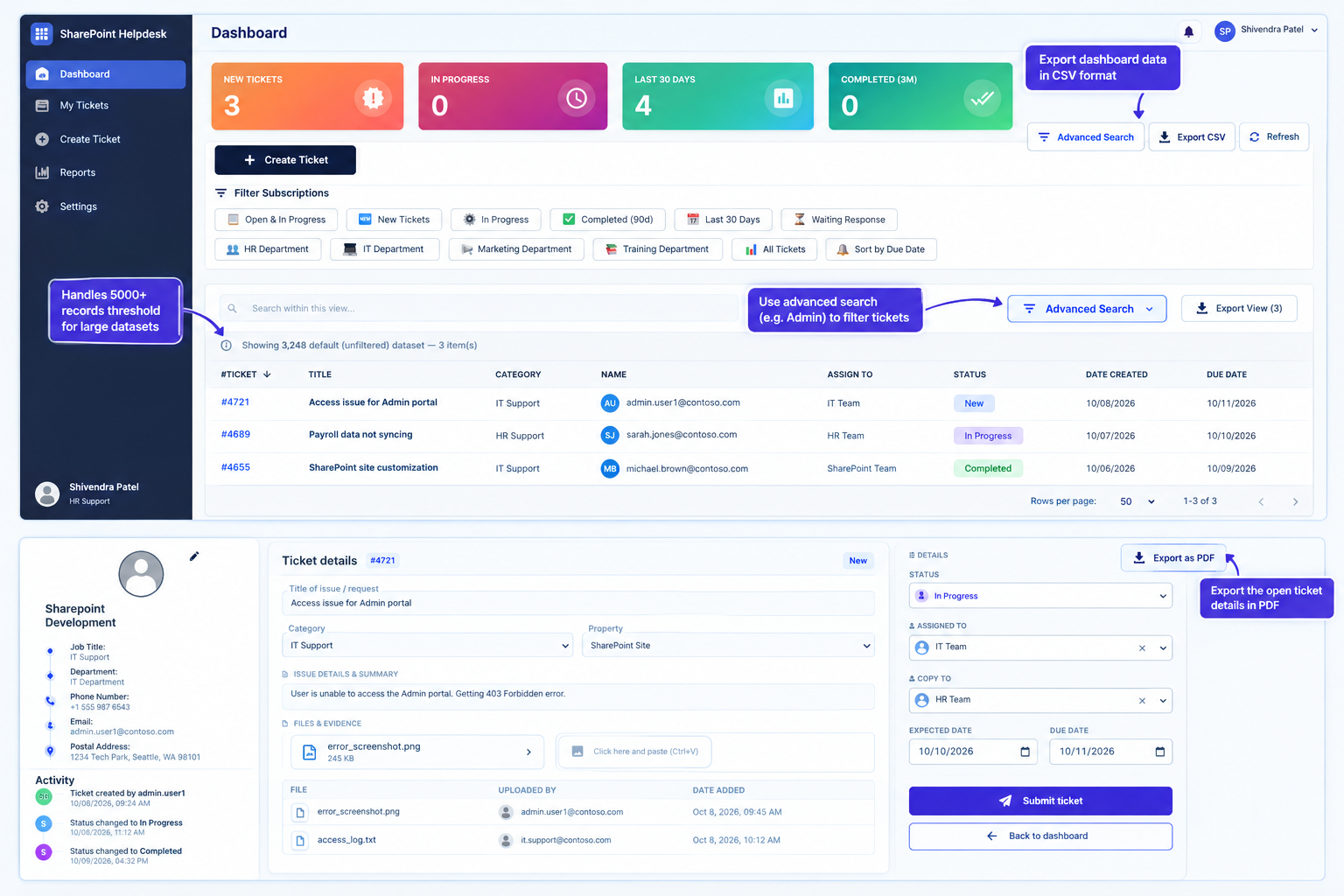
See how the Helpdesk works
One walkthrough of the dashboard and the ticket flow, from a request coming in to it being resolved.
Everything a support team needs, nothing it doesn't
A helpdesk that feels native because it is native to SharePoint and Microsoft 365.
Ticket tracking
Raise, view and update tickets in one place, with status, priority and a full history behind every request.
Category routing
Pick a category and the ticket goes to the right team, so requests land with the right people straight away.
Groups and permissions
Use your existing SharePoint groups to decide who can submit, who works tickets and who is copied in.
Power Automate ready
Connect flows for email alerts, escalations and approvals. Add the automation your team needs on top.
Your data, your tenant
Tickets are stored in SharePoint lists in your own Microsoft 365. No outside database and no third-party servers.
Admin provisioning
A built-in admin option sets up the lists and groups for you, so setup takes minutes rather than days.
Up and running in four steps
If you can add an app in SharePoint, you can deploy this.
Download
Get the
LOOP-trial.sppkgpackage from this page.Deploy
Upload it to your tenant App Catalog and deploy it.
Add to your site
Add the app to your SharePoint site, then place the web part on a page.
Provision
Use the admin provision option to create the lists and groups, then start logging tickets.
Skip the new platform
You already pay for Microsoft 365. Use it.
No new system to learn
Your team already works in SharePoint and Teams. The helpdesk looks and feels like the tools they use today.
Security you already trust
Access follows your Microsoft 365 sign-in and SharePoint groups, with no separate user list to maintain.
Fits how you work
Because it is built on lists, you can add columns, views and Power Automate flows without touching code.
Simple to own
No extra servers or databases to host, patch or back up. It lives where your other SharePoint content lives.
Try it on your own site today
LOOP Helpdesk for SharePoint
Download the trial package, deploy it to your tenant and see how it fits your team. No sign-up form, just the file.
Download LOOP-trial.sppkgSet-up in brief
- Upload the .sppkg to your App Catalog and deploy.
- Add the app to your site, then add the web part to a page.
- Run the admin provision option to finish setup.
Deploying a package needs App Catalog admin rights in your own SharePoint tenant. Once it is running, you can connect Power Automate flows for alerts and other automation.
Frequently asked
What do I need to install it?
A Microsoft 365 tenant with SharePoint Online, and someone with App Catalog admin rights to deploy the package.
Where is my ticket data stored?
In SharePoint lists in your own tenant. Nothing is sent to an outside database or to us.
How do alerts and automation work?
The helpdesk is designed to work with Power Automate. You can build flows for new-ticket emails, escalations, reminders and approvals using the list data.
Is the trial really free?
Yes. Download the trial package, deploy it and evaluate it. If you want the full version or changes for your process, email us.
Can you customise it for my organisation?
Yes. We offer set-up help and tailoring, such as categories, routing, views and automation. Email hello@spsolutions.tech with your needs.
Who do I contact if I get stuck?
Email hello@spsolutions.tech and we'll reply personally.
13+ years building on Microsoft 365
LOOP Helpdesk comes from a SharePoint and Power Platform consulting practice based in Orlando, FL, working with property management and real estate organizations.
- SharePoint 2010 to Online
- Power Automate
- Power Apps
- SPFx / React
- Microsoft Teams
- Azure
- Power Apps Fundamentals certified
Property management intranets
Custom SharePoint intranet design, development and ongoing maintenance, built to hold up as teams and processes change.
Process automation
Power Automate workflows that replace manual approvals and paperwork across leasing, maintenance and resident services.
Internal tools
Power Apps and SPFx tools your staff reach for every day, plugged directly into SharePoint data.
Exploring an IT career? Try The IT Roadmap.
Questions? Email us.
Help with setup, questions about the Helpdesk, pricing, or a new project. We read every message and reply personally.
hello@spsolutions.tech